Rea MCP Integration Guide
Welcome to the official documentation for implementing Model Context Protocol (MCP) connectors in Rea.pro - the agentic framework and orchestration platform for running automations and consulting pods.
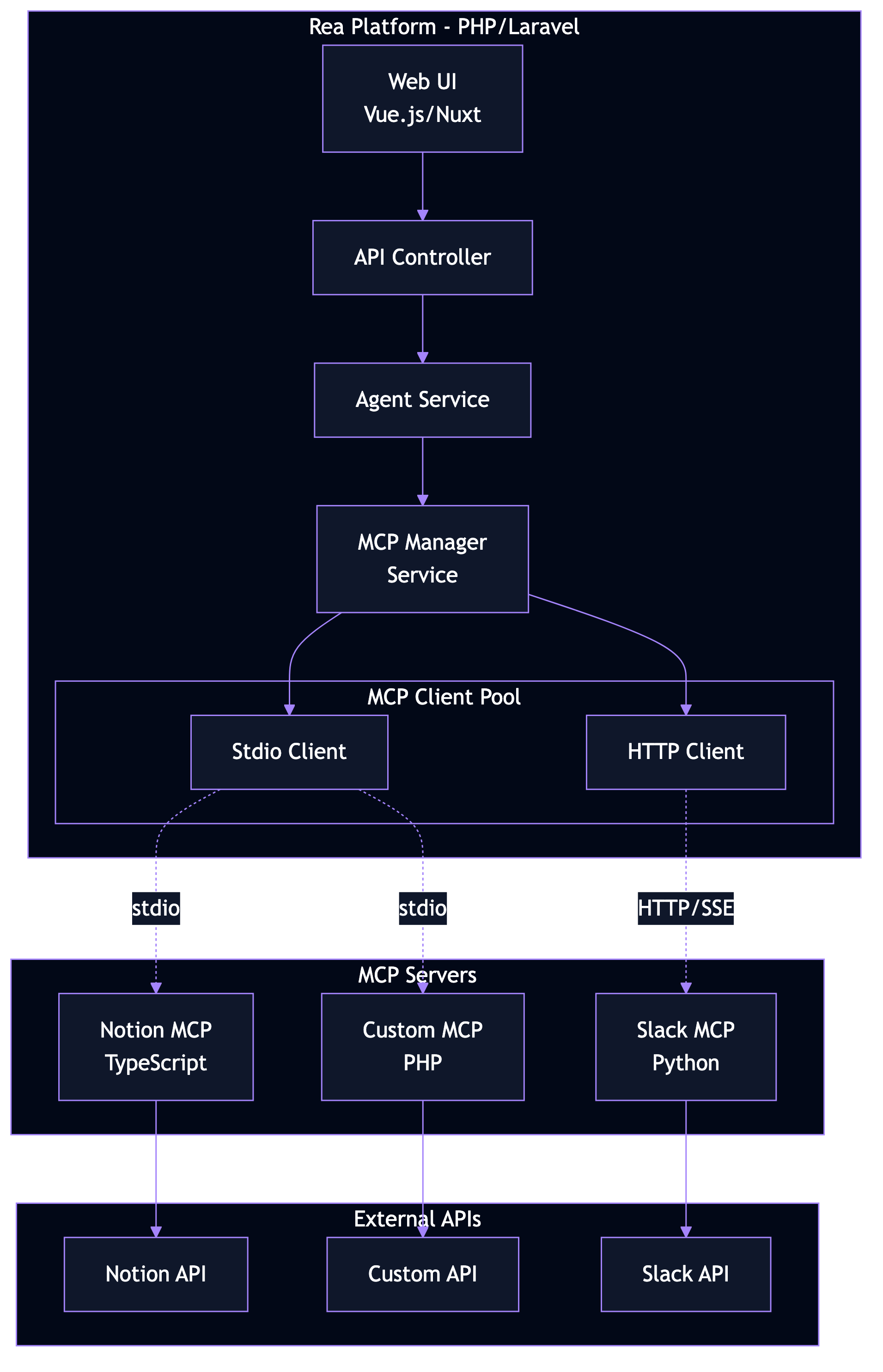
What is MCP?
The Model Context Protocol (MCP) is an open standard created by Anthropic that enables AI applications to connect with external data sources, tools, and workflows. Think of it as a universal "USB-C for AI" - a standardized way for AI agents to interact with the world.
Rea + MCP
Rea implements MCP in two directions:
| Direction | Description | Use Cases |
|---|---|---|
| MCP Host | Rea connects to external MCP servers | Access Notion, Slack, GitHub, and more |
| MCP Server | Rea exposes its capabilities to external clients | Let Claude Desktop trigger Consulting Pods |
Why MCP for Rea?
By implementing MCP support, Rea's LLaMA-powered agents gain:
- Standardized Integrations - Connect to any MCP-compatible service using a single protocol
- Tool Access - Allow agents to search, read, write, and interact with external systems
- Resource Context - Provide agents with relevant data from connected services
- Extensibility - Easily add new integrations without modifying core agent logic
- Security - Leverage MCP's built-in security model for safe AI-to-service communication
Quick Navigation
-
:material-rocket-launch: Getting Started
New to MCP? Start here to understand the basics and get up and running quickly.
-
:material-cog: Core Concepts
Deep dive into MCP primitives: Tools, Resources, and Prompts.
-
:material-code-braces: Implementation Guide
Step-by-step guides for implementing MCP in PHP/Rea.
-
:material-school: Tutorials
Practical examples including Notion MCP integration.
Rea Platform Components
MCP integrates with Rea's core components:
| Component | MCP Role | Description |
|---|---|---|
| LLaMA + Reflection | Tool Consumer | AI engine with enhanced reasoning calls MCP tools |
| Consulting Pods | MCP Tool | Multi-agent workflows exposed as callable tools |
| Command Room | MCP Resource | Activity capture data available as resources |
| n8n Workflows | MCP Tool | Automation workflows triggered via MCP |
Architecture Overview
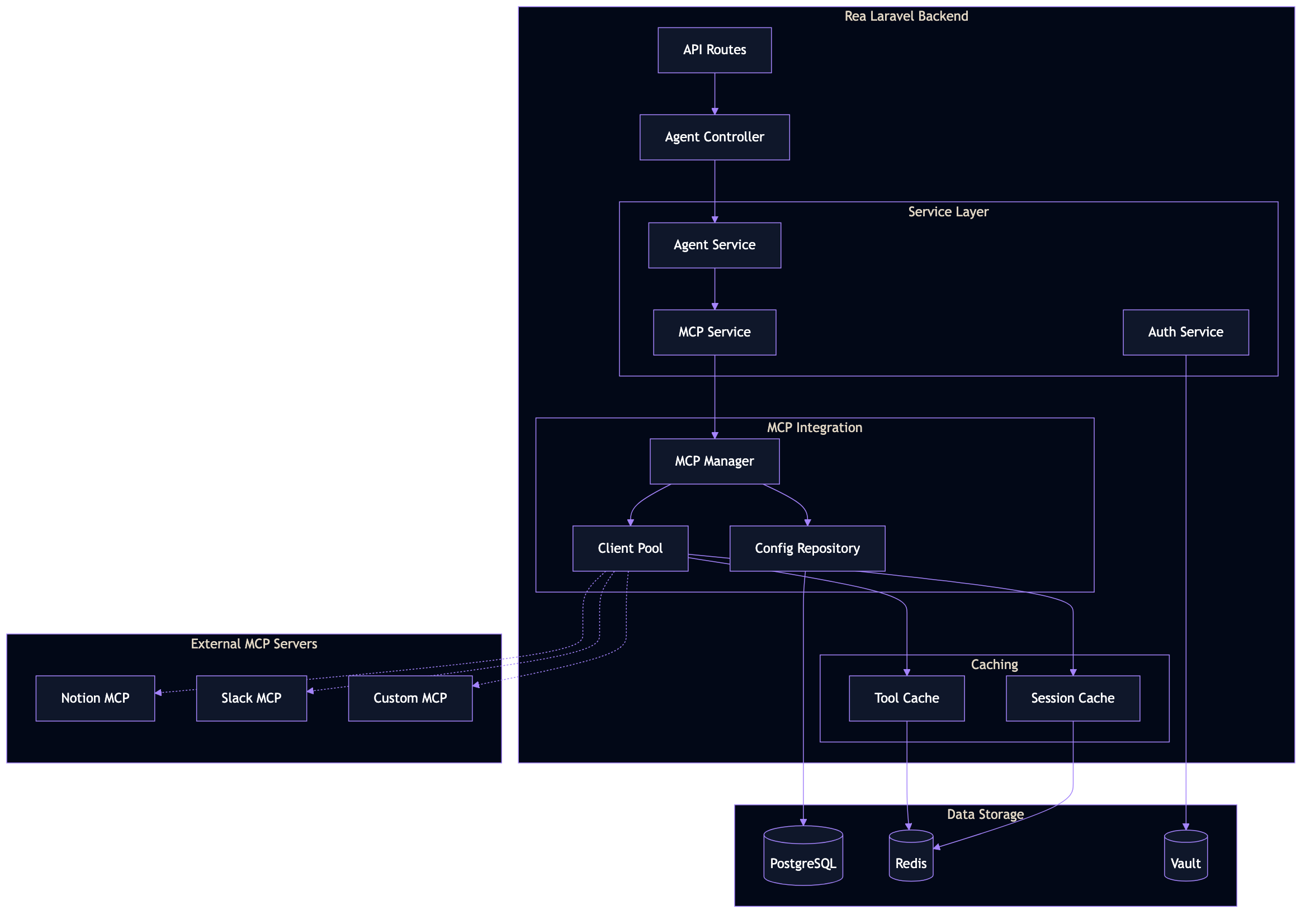
MCP uses a client-server architecture where Rea acts as both host (consuming external tools) and server (exposing Rea capabilities).
Getting Help
- Documentation Issues: Open a PR on the docs repository
- Feature Requests: Submit via the Rea feedback portal
- Security Issues: Contact security@rea.pro directly
Start with the Notion Tutorial
If you want to see MCP in action, jump straight to our Notion MCP Tutorial for a complete, working example.